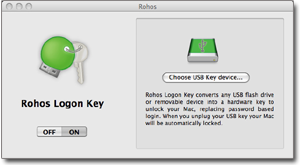
Due to increased interest around the world in Rohos Logon Key – two-factor authentication solution, Tesline-Service has been prompted to extend the program’s translation list. We’d like to present you – Portuguese, Japanese and Polish translations. You are welcome to see them!
 Rohos ãƒã‚°ã‚ªãƒ³ã‚ーã¯, USBドライãƒã‚’PCã®ã‚»ã‚ュリティトークンã«æ›ãˆã¦ã€USBトークンã«ã‚ˆã£ã¦å®‰å…¨ã«ã€ŒWindowsã€ã‚’æ載ã—ãŸPCã«ã‚¢ã‚¯ã‚»ã‚¹ã§ãã¾ã™ã€‚Rohosãƒã‚°ã‚ªãƒ³ã‚ーã¯è»Šã®éµã®ã‚ˆã†ã«æ©Ÿèƒ½ã—ã¾ã™ã€‚Rohos ãƒã‚°ã‚ªãƒ³ã‚ーã¯çµæžœçš„ã«ã¯æ‰‹å‹•ã§ãƒ‘スワードを入力をè¦ã™ã‚‹ã€ä»–ã«ã‚ãµã‚Œã¦ã„る原始的ãªPCãƒãƒƒã‚¯ã®æ©Ÿèƒ½ã¨ç•°ãªã‚Šã€ãƒ‘スワード方å¼ã«ä»£ã‚ã‚‹èªè¨¼ã®æ£è¦è§£æ±ºæ³•ã§ã™ã€‚
 Rohos Protuguese (Brazilian) O Rohos Logon Key transforma seu drive USB em um dispositivo de segurança para acessar seu computador. Com ele, você substitui o login com senha tradicional do Windows por um token que pode ser o seu Pen Drive, celular Bluetooth, cartão de memória, dispositivos USB Biométricos, entre outros. Web page Portuguese…
 Rohos Polish. Rohos Logon Key 2.5 obsluguje teraz systemy Windows Vista/2008.Nowa wersja Rohos Logon Key obsluguje systemy Windows Vista i Windows 2008 Serwer. Program otrzymal logo “Works Windows Vista”. Nowa wersja oferuje do uzytku nowe urzadzenia bezpieczenstwa dla ochrony komputera: USB tokeny takie jak Alladdin eToken, RuToken, uaToken, karty elektroniczne, biometryczne USB pen drive’y i telefony komorkowe z Bluetooth. Web page Polish…