
BlueTooth Logon Key – Wireless Logon solution.
 The next beta version of Rohos Logon Key includes a feature BlueTooth Wireless Logon that means you can log into Windows computer by using Bluetooth enabled Pocket PC or mobile.
Why mobile? Firstly, we were asked by the users “Is it possible to log in by mobile phone?” The next reason is that Wireless PC lock solutions already exist on the market – the idea is that you have a small “e-tablet” dongle in your hands and a receiver connected to USB port. It works like a car key.
The same could be by using your mobile – just come in and Windows gets logged on – just step out – and it gets locked/hibernated. So, the idea looks interesting but will see how it works in reality:
Download Rohos Logon Key 2.5 beta
At the first tests the program works well.
How to set up mobile login:
- The BlueTooth USB adapter should be installed with the native Windows drivers
- You should install Rohos program only to PC. It does not require to install/upload anything to your mobile.
- Now you can turn-on your bluetooth function on the mobile
In the Options dialog box select “BlueTooth phone/pocket PC” device type and ‘Auto-Lock’ function:
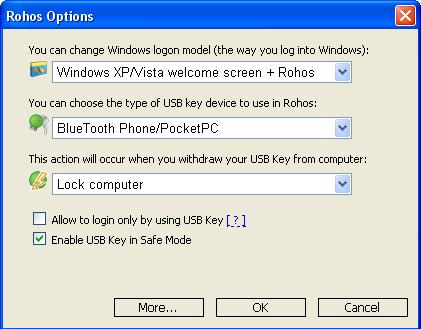
Then click OK and open Configure USB Key dialog. Please don’t worry, there are a lot of “USB flash drive” strings in the program 🙂
Configure USB Key dialog will detect your mobile, and you can type your pass and press OK. You can try to log in by the phone.
Tips & Tricks
- The BlueTooth USB adapter should be installed with the native Windows XP drivers
- The logins data are saved in the local computer (in encrypted form) but not in the mobile
- The Rohos program just recognizes your mobile by its name and Mac address
- We have noticed some bugs in BT function if your PC goes to hibernation and out
- If you go away your PC can be locked out – but in the same moment BT adapter can again detect it for the moment and PC gets unlocked by the program.. So be aware.
Please comment on.