We continue to work under Rohos Logon Key development and now implemented our customers’ latest feedback and bug reports. A new minor update contains several important improvements.
What’s new in Rohos Logon Key 5.6:
Added feature self 2FA key enrollment in Login screen mode. Enables automatic registration of 2FA method by workstation user during Windows login screen.
Improvements for 2FA enforcement and filtering default credentials providers in Windows 11
Emergency Login improvements, resetting QA attempts after successful login in Active Directory mode.
2FA Login improvements for long login passwords.
Download and Install over the existing Rohos Logon app to try new features: Download the latest Rohos Logon Key v.5.6 (15-day trial full version) >>
Rohos Logon Key software includes built-in safeguards to prevent bypassing two-factor authentication (2FA). This may occur when a Windows desktop session is initiated by a 2FA-enabled user account, but the 2FA credentials have not been collected by Rohos.
During the latest support incident, we observed that Rohos’ “2FA bypass control” triggered the screen lock procedure each time after the user logged in. Finally, it was identified that 3-rd party software, which installed a Credential proxy DLL ( to filter all user login sessions), implicitly disabled Rohos two-factor authentication control. However, due to the “2FA bypass control” feature, the automated session lock was initiated each time a user logged in using a plain password login.
The service ADSelfService Plus Client Software\ADSSPProvider64.dll, with GUID {B80B099C-62EA-43CD-9540-3DD26AF3B2B0}, has been identified as the root cause of the issue. The service installation re-enabled the conventional password-based single-factor login field (icon) on the Windows login screen. This, in turn, allowed any employee to use a standard password-based credential icon on the login screen, rather than the one-time password login 2FA method provided by Rohos Logon Key.
To correct the issue, the customer was recommended to add 3rd third-party service GUID to the exclusion list at the Options – More… dialog box, as highlighted in the screenshot below.
/1/wp-content/uploads/2016/06/rohos.png00SafeJKA/1/wp-content/uploads/2016/06/rohos.pngSafeJKA2025-12-18 13:07:402025-12-18 15:02:41How a 2FA bypass incident can occur in real life.
Fixed QR-code display error for “Setup OTP” and “Setup Smartphone” login methods. Now Rohos is generating local SVG file with QR code image instead of using google API.
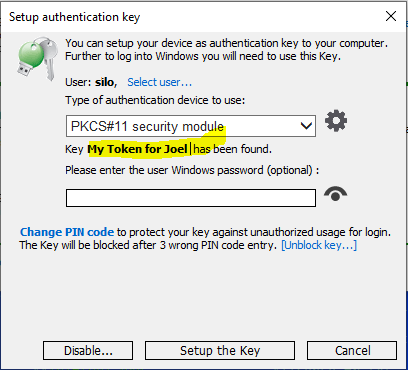
Addd 2FA Key name label option when in “Setup Authentication Key” dialog. Now it is possible to assign a label name to each authentication key to distinguish among multiple keys in addition to serial UID number.
Tested compatibility with ACS PocketKey FIDO USB token – FIDO® Certified USB Security Key by ACS.
Fixed error during Google OTP setup, click on Display QR code resulting error 404 due to deprecated google API.
Other minor bug fixing and improvements
Setup Authentication Key dialog box
Just start typing the new name by clicking on Key Label name in “Setup Authentication Key” dialog.
We continue to work under Rohos Logon Key development and now implemented our customers’ latest feedback and bug reports. A new minor update contains several important improvements.
What’s new in Rohos Logon Key 5.4:
Improvements for RFID cards login method for RFIDeas pcProx reader.
Improvements for 2FA enforcement and filtering default credentials providers in Windows 11
Emergency Login improvements
Download and Install over the existing Rohos Logon app to try new features: Download the latest Rohos Logon Key v.5.4 (15-day trial full version) >>
In brief: Recently a report of the cyber-attack (October 2023) on the British Library was published and it shows that on some on-premise servers multi-factor authentication (MFA) was not fully implemented, and the absence of MFA contributed to the attackers’ ability to enter the system.
The 18 pages report contains 16 Learning lessons from the attack and lesson nr. 3 is Fully implement multi-factor authentication –
“Multi-factor authentication needs to be in place on all internet-facing endpoints, regardless of any technical difficulties in doing so. The Library had MFA in place for all end-user technologies, but not on certain supplier endpoints”.
Rohos Logon Key adds strong two-factor authentication for Windows Remote Desktop login and safeguards to prevent 2FA / MFA bypass attacks. Rohos Logon implements multi-factor authentication control, where you can combine different MFA methods: password, PIN code, Smartphone, or strong authentication devices like U2F key, YubiKey, Google Authenticator One-Time password codes, SafeNet iKey tokens, or RFID cards. With Rohos you can protect standalone computers, Active Directory workstations, Terminal Servers, Azure and AWS workstations, or Apply MFA on top of other remote assistance solutions like TeamViewer, and AnyDesk. Rohos is the only MFA solution that allows the prevention of MFA bypass, reporting to SIEM and creating smartphone push notifications in case of any MFA discrepancies.
Download and try the latest Rohos Logon Key for 15-day (full version) >>
We continue to work under Rohos Logon Key development and now implemented our customers’ latest feedback and bug reports. A new minor update contains several important improvements.
What’s new in Rohos Logon Key 5.3:
Improvements for Mifare RFID cards to support quick card swipe in some scenarios.
Improvements on Azure workstation login via RDP to correctly reuse NLA credentials in some scenarios.
Improved LDAP queries after LDAP_REFERRAL error code.
Improved 1FA login possibility by using NLA credential for Remote Desktop access when user account have 2FA methods such as Yubikey, FIDO U2F, which in some cases lead to 2FA enforcement.
Improvements for Mifare RFID Cards login method to use full-size card UID number.
Added new option for 2FA bypass control feature – “Notify any successful login (2FA/1FA)” which will create push notification for Rohos Logon Key Android/iOS app in case of any login into your Server.
Improved Emergency Login mode that now allows to use all possible login methods after a successful Questions/Answers procedure. You need to restart Windows after the Rohos Emergency Login procedure to access all possible credentials methods, such as Face Login, PIN code, etc, for normal login. These changes apply only for console based computer access.
Improved Rohos Logon Key for Android app, new version 2.17 now has been published on Google Play Market. Added “2FA events list” and “Copy Push URL to clippboard” commands.
Rohos Logon Key adds strong two-factor authentication for Windows login and safeguards to prevent 2FA / MFA bypass attacks. Rohos allows implementing multi-factor authentication decision solution, where you can combine different authentication devices: password, PIN code, Smartphone, or strong authentication devices like U2F key, YubiKey, Google Authenticator One-Time password codes, SafeNet iKey tokens, or RFID cards. With Rohos you can protect standalone computers, Active Directory workstations, Terminal Servers, Azure and AWS workstations, or other remote assistance solutions like TeamViewer, and AnyDesk.
We are glad to announce Rohos Logon Key 5.2 beta release with Windows on ARM support that now works on Microsoft Surface PRO X2 based on SQ1,SQ2,SQ3 CPU and other Windows laptops based on Snapdragon CPU.
What’s new in Rohos Logon Key 5.2:
Improved AD group lookup code
Fixed policy to require 2FA in case of AD group lookup failed.
Set to ignore NLA credentials over RDP and require user password entry again if the following option is enabled – “require a password with the 2FA key”.
Added support for ARM64 Windows for Windows Surface
MSI setup package updated for compatibility with Windows on ARM.
Other minor improvements.
Download and Install over the existing Rohos Logon app to try new features: Download the latest Rohos Logon Key v.5.2 (15-day trial full version) >> Download MSI package for Rohos Logon Key v.5.2.
About Rohos Logon Key
Rohos Logon Key adds strong two-factor authentication control for Windows login and safeguards to prevent 2FA / MFA bypass attacks. Rohos allows implementing multi-factor authentication decision solution, where you can combine different authentication devices: password, PIN code, Smartphone, or strong authentication devices like U2F key, YubiKey, Google Authenticator One-Time password codes, SafeNet iKey tokens, or RFID cards. With Rohos you can protect standalone computers, Active Directory workstations, Terminal Servers, Azure and AWS workstations, or other remote assistance solutions like TeamViewer, and AnyDesk.
/1/wp-content/uploads/2016/06/rohos.png00SafeJKA/1/wp-content/uploads/2016/06/rohos.pngSafeJKA2023-09-01 11:17:342024-04-16 10:52:59Windows ARM support in Rohos Logon v.5.2
This update is free for registered users. We also update Rohos Mini setup package with the improvements mentioned above.
About Rohos Disk Encryption
Rohos Disk program allows you to encrypt your computer, USB flash drive, or Cloud folders. It is designed for those who have megabytes of sensitive files and who is really concerned with privacy and information security. To protect access to encrypted data you can use electronic keys like USB flash drive or security Keys or Smartphone. You may also work with secret files by using Rohos Disk for Android.
/1/wp-content/uploads/2016/06/rohos.png00SafeJKA/1/wp-content/uploads/2016/06/rohos.pngSafeJKA2023-07-06 12:04:102023-07-06 12:20:27Rohos Disk Encryption v.3.3 and Rohos Mini update
We are glad to announce Rohos Logon Key 5.0 stable version with minor bug fixes and improvements on top of 5.0 preview release.
What’s new in Rohos Logon Key 5.0:
Fixed “Users and Keys” dialog box.
MSI setup package updated for compatibility with Microsoft Defender.
Fixed PIN code dialog box behaviour in logon screen.
Fixed RFID card 2FA method and login loop issue after card removal action.
Improvements in Google Auth OTP 2FA method for workstations in Windows Active Directory.
Minor fixes in Rohos Remote Config.
Download and Install over existing Rohos Logon app to try new features: Download the latest Rohos Logon Key v.5.0 (15-day trial full version) >>
For customers with Rohos Logon Key v.4.8-4.9 license, the update is available with 50% discount, please refer to the registration letter or apply for a discount now.
About Rohos Logon Key
Rohos Logon Key adds strong two-factor authentication control for Windows login and safeguards to prevent 2FA / MFA bypass attacks. Rohos allows implementing multi-factor authentication decision solution, where you can combine different authentication devices: password, PIN code, Smartphone, or strong authentication devices like U2F key, YubiKey, Google Authenticator One-Time password codes, SafeNet iKey tokens, or RFID cards. With Rohos you can protect standalone computers, Active Directory workstations, Terminal Servers, Azure and AWS workstations, or other remote assistance solutions like TeamViewer, and AnyDesk.
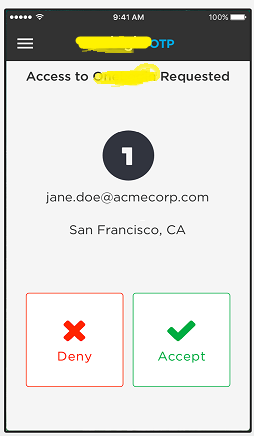
According to information regards the latest security incidents with LastPass, Cisco, Uber and Okta, adversaries exploited two-factor authentication procedures to disable or bypass access control. Such techniques as MFA Bombing, Fishing, MFA fatigue, and 2FA Men-in-the-Middle (MiTM) attack were used to mislead end-user, steal plain text passwords and perform MiTM on two-factor authentication. User-friendly feature “Allow authentication request” was miss-used as a tool. In all cases, adversaries were able to bypass two-factor authentication by either disabling it on target accounts, stealing MFA secrets, or adding a new MFA profile.
Social Engineering (SE)
In the case with Uber, the attacker first somehow discovered the employee’s WhatsApp number, started a Messaging chat, and send an URL to the victim with the fake Uber site login page. After that intruder applied SE to convince the legitimate user to enter login credentials on a spoofed Uber login page.
MFA bombing by push notifications
After successfully stealing user login and password, the attacker initiated an MFA bombing/MiTM attack by login to a legitimate Uber login page multiple times, generating a storm of push notifications “Accept login request” to employee’s smartphone. At some moment the user confirmed the request thus allowing the attacker to access the system.
MFA provider re-enrolling
In case with Microsoft breach, hackers re-enrolled smartphone-based MFA (push tokens) on new device by accessing Okta MFA provider account (or partial MFA vendor infrastructure takeover), and then performing login into the target user’s MS accounts by using MFA duplicates.
How to improve your MFA / 2FA control ?
Here are a few pieces of advice on how to check your current MFA implementation for improvements:
Train your employees on how to report / act when MFA access requests on the smartphone appeared at Inappropriate times. After training, perform field tests to generate inappropriate MFA requests to ensure proper reflections by the end user.
Check if your employees know about a decent and friendly way (Social Re-Engineering?) to verify via phone if they really speak with somebody pretending to be a ‘support desk representative’ from your company.
Monitor your system’s remote access for inappropriate/suspicious/abnormal activity, for example – out-of-work login time, MFA failure, or too long MFA approval time.
Continue updating your MFA toolset by employing new MFA technologies like U2F FIDO, FIDO2, WebAuthn in parallel with the current MFA.
Check if your MFA vendor/solution has new features to filter access by IP or MFA device. Check if the MFA solution logs MFA activities parameters.
Use gamification within your IT team to simulate or imagine how MFA re-enrollment, misuse and bypass may happen in your organization.
What about Rohos Logon Key ?
Rohos Logon Key adds strong two-factor authentication control for Windows Remote Desktop access. Rohos allows to implement and adopt multi-factor authentication into the business processes with minimal side effects. In Rohos we always experiment with new features.
You may employ different MFA methods: password, PIN code, Smartphone or strong authentication devices like FIDO2 U2F key, YubiKey, Google Authenticator One-Time password codes, USB iKey tokens or RFID cards per different user groups depending on requirements or technical skills.
It is possible to apply MFA by IP filter.
It is possible to use MFA bypass control – lock desktop immediately when MFA was not used for login session.
Rohos log all type of MFA events: Login session time, MFA prompt time and successful MFA duration time for each user.
Rohos for Android/iOS app does not uses Push notifications ‘Approve access request’. With Rohos MFA app – Notifications bombing is not possible.
Rohos allows to add of more MFA redundancy by setting up FIDO2 physical key and Smartphone app for the specific user account. The MFA diversity can be used to distinguish between logins of legitimate user MFA or stolen/ re-enrolled MFA.




 About Rohos Disk Encryption