
MiFare 1K RFID smart-card support in Rohos Logon
Updated Aug 2018.
Tesline-service announce that now Rohos Logon Key support wireless smartcard MiFare 1K/4K/ultralight. This contactless smartcard technology (RFID) with over 1 billion smart card chips and 10 million reader modules sold. And now this RFID technology can be used with Rohos products for secure login into Windows, Mac or encrypted Rohos Disk.
There are few different types of MiFare that Rohos can support but we have carried out tests with MIFARE Classic (Standard) 1K in smart card factor.
Rohos Logon Key allows using MiFare cards for 2-factor authentication into any Windows, Active Directory network and Remote Desktop Services. A single RFID card can be used to access multiple Pcs and accounts.
How to try MiFare in Rohos
- Download Rohos Logon Key
- Open Rohos Logon Key > “Options”
- Choose “MiFare 1K RFID” as USB Key device from the list
- Click on “Options” link below the list and setup Mifare options and choose default RFID reader device.
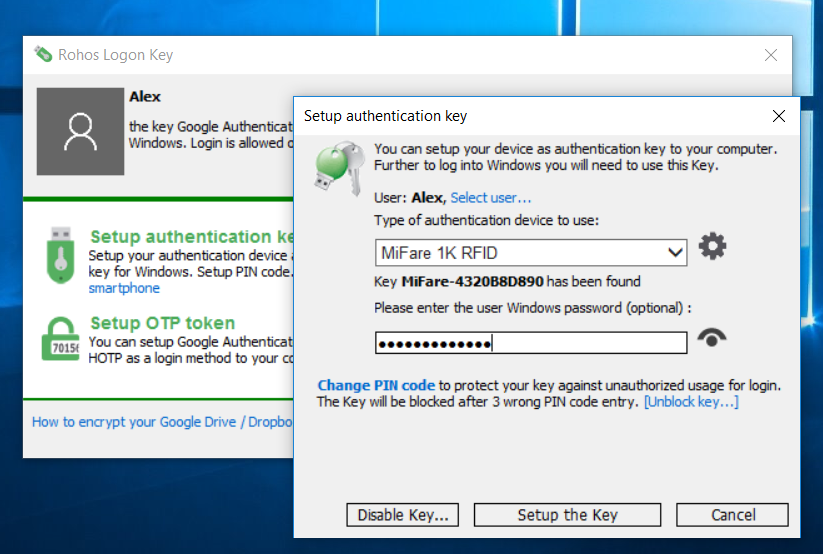
Notes on MiFare 1K/4K support in Rohos Logon Key
- Rohos allows to reuse existing MiFare tags – it allow customize the starting block number (sector) where to store rohos data and co-exist with 3rd party software data.
- Rohos allows to use customized authentication “Key A” . This will allows to use protected Mifare cards but rohos will not prompt PIN code each time. Default KeyA is “FF FF FF FF FF FF”
- Rohos data size on Mifare occupies 100 bytes minimum (1+ 7 sectors ) and up to 528 bytes.
- “Change PIN” command changes Mifare “Key A” to PIN value (6 bytes) of the trailer blocks of the selected block range.
MiFare 1K options
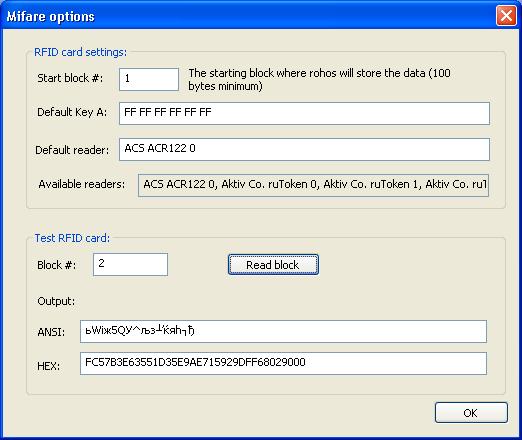
Rohos Logon > Options > Authentication device options.
MiFare options in Rohos allows to :
- Change default authentication “Key A”
- Set starting block number (sector) for Rohos data.
- Set a default PC/SC reader name
- Read any MiFare card block number (sector) to analyze Mifare memory. This help to identify first free block number to keep use existing cards with Rohos.
- Treat cards in ID-only mode for MiFare ultralight support, when no data is actually stored on card memory.
By default, Rohos is able to use default Key A to read/write card without asking for a PIN code each time. If PIN code is changed then it will be asked each time Rohos accesses the card.
Compatible with 3rd party RFID systems
Please note – If you are using 3rd party RFID solution:
- You need to test your RFID cards to find out first free memory block that can be reused by Rohos Logon (100-300 bytes).
- Authentication Key in RFID card can be customized by 3rd party Application. But probably there is a few memory blocks available with default Authentication Key A. So you can find these blocks.
How to test your MiFare card to use it with Rohos Logon:
- At the “Test RFID card” group enter 5, 6, 7 – 100 into “Block#” and click “Read”.
if this Block Number is free and uses default authentication key –
The Output should be 16 chars length.
If the Output contains many zeros at the end “XXXXX 0000000000000000” – it means the memory is free. - When you found the first free block you may set it as “Starting Block#”
- Try to use Setup USB Key dialog to configure RFID card for Rohos logon.
- Test Rohos Logon and then test 3rd party RFID system again for compatibility.
Please note you need to set this value “Starting Block#” at all PCs where Rohos Logon Key is installed.
Known Issues:
Please note after installing Rohos Logon you need to Open options and select “Mifare 1K RFID” as authentication device.
- Error “There is no connected RFID reader”
– open Rohos Logon > Options > Device Options and check out “Available readers” value. You may copy/paste a listed RFID reader name into “Default Reader” field and try again. - “Enter PIN” dialog displayed – and you dont know PIN code. What is default PIN?
– Rohos already uses a default PIN i.e. authentication key A for MiFare (FF FF FF..).
“Enter PIN” request means the following –
a) MiFare 1K card is used/formatted by 3rd party software (with a custom authentication key, i.e. PIN code)
b) There is a RFID solution in your company that occupied some MiFare card memory blocks – you may specify starting block 5,7 etc.
In both cases read “How to test your MiFare card to use it with Rohos Logon” chapter.
If you have any other problems contact support and attach rohos logon *.log files from c:\program files\rohos folder
Tested hardware:
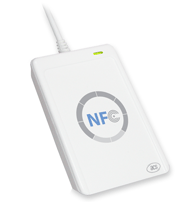
- ACS ACR122 NFC Contactless Smart Card Reader or ACR128
- SCM SCL010 RFID reader
- SCM SCL011G and SCL3711
- Mifare 1K smart card or Yubikey OTP token with RFID module.
The sample of NFC Reader ACR122 and SCM SCL010 and sample of MiFare cards were provided by our partner Futako Co, LTD Taiwan.
Download Rohos Logon Key (for Windows 2000, XP, Vista, 7, 8)