
 Tesline-Service SRL has developed a convenient solution for replacing your system password with a USB flash drive. Rohos Logon Key lets you log into your Windows without scrambling for passwords — just plug in a USB flash drive whenever a password is required to log in or unlock desktop, and you’re in.
Update: Now it works with Windows Vista!
Why should you use USB flash drive to log into Windows?
 You don’t need to remember and manually type in your Windows password (but your system is password protected as well)
- You can use HUGE secure passwords that comply with the “security-enhancing” principles
- Enjoy fast and automatic login into Windows. User can be automatically logged into Windows as they insert the device into the USB port, it is not necessary to type in your password.
- Automatic Windows lock when user unplugs USB Key from computer.
 Higher security with PIN code for USB Key – to stop anyone else logging in with it. Learn more on how two-factor authentication works in Rohos Logon Key.
This option allows you to avoid re-inserting USB Key in “sign-in – lock – unlock” use case. Just press Win+L to lock and click on USB icon on the welcome-screen to unlock – enter PIN and you are in.- You can disable anyone to work with your computer without your USB flash drive.
How does “USB-stick secure login” work in Windows?
First you need to install Rohos Logon Key and setup USB flash drive as an access key to you Windows.
1. When you plug-in your USB flash drive into USB port, you are identified. Application reads login and password information that is entered automatically into Windows login dialog.
Here is how your password is entered automatically:

Here is the Rohos USB key login button on the Windows Vista login screen:
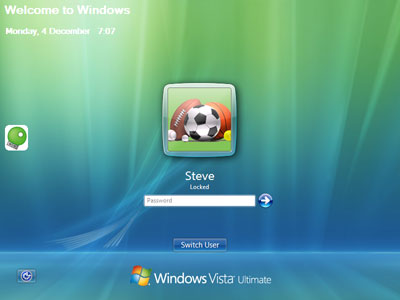
2. When you unplug your USB flash drive key, the program automatically locks Windows session.
Note: You can continue using your USB Key to store and transfer files.
USB-stick login key and security
You can ask: “It looks cool… but what will happen if the owner has lost the key or it was stolen… does it mean that anyone can get my password or access to my Windows?”
Real user password is not stored on the USB Key. Also you should protect USB Key with a PIN code – to prevent anyone use your USB Key to access Windows account without you.
Rohos Logon Key stores only “password-fingerprint” on the USB flash drive that is used to generate user password for login. Also USB Key cannot be duplicated just by simple copy-paste method.
FAQ: “but what will happen if I’ve lost the key… is there anyway to login to Windows again?”
Yes, sure. Program has Emergency Logon feature that helps to owner to access Windows computer if USB key was damaged or lost.
Logon Integration
Authentication is integrated within the Windows security
Rohos Logon works on the Windows logon desktop and just automatically enters user password into login box when it is required. It integrates into any Windows logon configuration. Thus, no security problem will be encountered just because you installed Rohos Logon.
Completely simulate Smart Card logon
In comparison with Smart Card Logon, Rohos Logon Key provides more functions that are easier to use. In corporate networks environment Rohos Logon can stop users to use USB login key to store and transmit personal files.
It is considered to be the most convenient and user-friendly password replacement application on the market.